Mastering the Art of One-Point Lessons (OPL): A Practical Guide for Lean Teams
Ever tried explaining a crucial process change only to see blank stares across the shop floor? Or worse, people nod in agreement but revert to old habits the next day? One-Point Lessons (OPLs) are here to save the day. They’re designed to share essential knowledge quickly, clearly, and visually, making them an indispensable tool in Lean environments.
In this guide, we’ll break down what OPLs are, how to structure them, and the steps to create your own. Whether you’re addressing a machine setup issue, a safety update, or a quality improvement, OPLs ensure that key lessons stick, reducing errors and improving process efficiency.
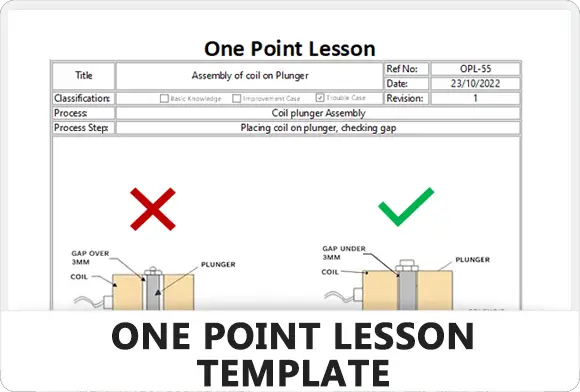
Get this and many other great templates from our templates section.
What Is a One-Point Lesson (OPL)?
A One-Point Lesson (OPL) is exactly what the name implies—one lesson, one topic, one point of focus. It’s typically a single-page document that combines text and visuals to communicate essential information quickly.
The goal? Provide clear instructions that operators can grasp and apply within minutes, whether they’re learning how to reduce machine downtime or prevent quality defects.
Where are OPLs commonly used?
- Training operators on machine setup, operation, or maintenance.
- Highlighting safety guidelines to reduce on-the-job hazards.
- Sharing process improvements for faster, error-free production.
- Documenting troubleshooting steps for common equipment issues.
By focusing on just one topic, OPLs help eliminate confusion and improve retention. Instead of lengthy training sessions or thick manuals, a quick glance at an OPL can give team members exactly what they need to know to perform the task effectively.
Example:
Imagine an operator discovers that adjusting the alignment of a machine saves 10 minutes per cycle. Instead of keeping this knowledge to themselves or sharing it informally, they document it using an OPL, complete with a photo of the correct setup. This lesson is then distributed across teams, creating a standardized improvement.
Ready to create your own? Continue below.
Key Elements of an Effective One-Point Lesson (OPL)
To make sure your One-Point Lesson hits the mark, it needs to be clear, concise, and visually appealing. Let’s break down the essential components that every OPL should include:
1. Clear and Descriptive Title
Your title should tell the reader exactly what the OPL covers. Think of it as a mini-summary of the lesson. Avoid vague titles like “Machine Setup” and instead go for something specific, like “How to Align Rollers for Optimal Output.”
Pro Tip: The title should grab attention while remaining short and direct.
2. Problem Statement or Objective
Define why the lesson matters. Are you solving a problem, sharing a process improvement, or preventing an issue? This section clarifies the purpose of the OPL and gives context to the team.
Example:
Objective: Reduce errors during assembly by standardizing part alignment.
3. Visual Aid or Diagram
A picture is worth a thousand words, and this is especially true for OPLs. Include photos, diagrams, or drawings that illustrate key points. If the lesson involves machine operation, a picture showing the correct setup can be far more effective than a paragraph of instructions.
Visual Tips:
- Use real photos when possible for authenticity.
- Annotate the image to highlight critical details (e.g., arrows or labels).
- Ensure visuals are clear, not cluttered.
4. Step-by-Step Instructions (Keep It Simple)
Break down the lesson into concise steps using bullet points. Avoid lengthy paragraphs and focus on the essentials—3 to 5 steps are ideal.
Example:
- Step 1: Inspect the roller alignment using the reference guide.
- Step 2: Adjust the roller to match the correct position indicated by the marker.
- Step 3: Lock the alignment in place and confirm settings before running the machine.
Tip: Use action verbs (e.g., inspect, adjust, confirm) to create clarity and focus.
5. Do’s and Don’ts (If Applicable)
This section is optional but can be extremely useful. Highlight common mistakes to avoid or actions that should always be followed.
Example:
- ✅ Do ensure the rollers are tightened before machine operation.
- ❌ Don’t skip alignment checks between batches.
6. Contact or Author Information
Include the name of the person who created the OPL and their contact details. This is important in case further clarification is needed or feedback is required.
Layout and Formatting Tips:
- Keep the OPL to one page for quick consumption.
- Maintain a clean and uncluttered design with white space for readability.
- Use headings, bullet points, and icons to make scanning easy.
With these key elements in place, you’re ready to craft a One-Point Lesson that your team will understand and apply. But how do you actually create one efficiently? In the next section, we’ll explore a 5-step process to help you develop OPLs quickly and effectively.
How to Create a One-Point Lesson (OPL) in 5 Steps
Now that you know what makes an OPL effective, let’s walk through the process of creating one step by step. Follow this method to ensure your lesson is clear, concise, and actionable.
Step 1: Identify the Core Topic
Start by selecting one key piece of knowledge or skill that you want to share. Avoid trying to cover too much at once—focus on a single task, improvement, or safety guideline.
Questions to ask:
- What common mistakes could be prevented with this lesson?
- Is there a process improvement or tip that saves time or reduces errors?
- Could this lesson be used for training or retraining purposes?
Example: An operator frequently misaligns parts during machine setup, leading to defects. The OPL topic could be “Correct Part Alignment for Assembly.”
Step 2: Gather Visuals and Supporting Information
Take photos, draw diagrams, or create simple sketches that illustrate the key point. Ensure the visuals directly support the lesson, making it easier for workers to understand and act on the information.
Pro Tip:
Capture visuals during real operations to ensure accuracy. If necessary, annotate them with arrows or labels to highlight important details.
Example Visual: A photo showing the correct part alignment with markers indicating key reference points.
Step 3: Write Simple, Clear Instructions
Keep your instructions short and to the point. Use bullet points or numbered steps to break down the process, and stick to action-oriented language (e.g., inspect, adjust, confirm).
Tips for writing instructions:
- Avoid long explanations—less is more.
- Stick to 3-5 steps for optimal readability.
- Use language your audience understands—no technical jargon.
Example Steps:
- Place the part on the fixture according to the reference guide.
- Check alignment using the indicator marks.
- Adjust the position as needed and tighten the clamp.
- Run a test cycle and verify the result.
Step 4: Format and Design the OPL
Organize the OPL with a clean and logical layout. A well-formatted lesson ensures the reader can quickly absorb the information without feeling overwhelmed.
Key formatting tips:
- Place the title and objective at the top of the page.
- Include the visual next to or above the instructions for easy reference.
- Leave white space to avoid clutter.
- Highlight critical points using bold or color (e.g., red for warnings).
Pro Tip: Keep it on one page. If it requires more, consider splitting it into separate OPLs.
Step 5: Review, Test, and Distribute
Before rolling out the OPL, test it with a few team members to ensure it’s easy to follow. Ask them to complete the task using only the OPL and gather feedback.
Checklist for review:
- Are the instructions clear and actionable?
- Are the visuals helpful and correctly labeled?
- Is the lesson short enough to be completed in under 10 minutes?
Once finalized, print and post the OPL at the point of use (e.g., machines, workstations). You can also distribute digital versions via email or internal systems for easy access.
Bonus Tip: Get Feedback and Continuously Improve
Just like any other Lean tool, OPLs should evolve with the process. As new improvements or feedback emerge, update the lesson to keep it relevant and effective.
By following these steps, you’ll create One-Point Lessons that effectively transfer knowledge, prevent mistakes, and improve overall efficiency
Best Practices and Common Pitfalls to Avoid
Even with a well-structured One-Point Lesson, success isn’t guaranteed unless you implement it correctly. Let’s go over best practices to maximize impact and avoid common pitfalls that could reduce effectiveness.
Best Practices for Effective OPLs
1. Keep It Short and Focused
The core strength of an OPL is simplicity. Make sure the content is limited to one key lesson that can be understood and applied in under 10 minutes. If you find yourself including too many details, consider splitting it into multiple lessons.
Why it matters: Overloading an OPL dilutes its focus and makes it harder for workers to retain key information.
2. Make It Accessible at the Point of Use
Place printed versions of the OPL where they’re needed most—on machines, workstations, or assembly lines. Alternatively, digital versions can be shared through internal systems or accessible tablets on the shop floor.
Why it matters: If workers can’t find the lesson when they need it, the knowledge transfer fails.
3. Involve Operators in the Creation Process
When operators help create the OPL, they’re more likely to understand and embrace it. Their hands-on knowledge ensures the instructions are practical and relevant.
Tip: Ask them for feedback after using the OPL and incorporate suggestions into future revisions.
4. Regularly Review and Update Lessons
Processes evolve, and so should your OPLs. Conduct regular reviews to ensure lessons reflect the current best practices or updates in standard operating procedures.
When to update:
- After a process improvement is introduced
- When feedback reveals gaps or confusion
- When performance data shows repeated errors
5. Train and Reinforce Knowledge with Follow-Ups
While OPLs are designed for quick knowledge transfer, follow-up sessions can help reinforce the lesson. Brief team discussions during meetings or morning huddles are a great way to review key OPLs.
Common Pitfalls to Avoid
1. Overloading the OPL with Information
It’s tempting to add extra tips, background context, or additional steps, but this defeats the purpose. An overloaded OPL leads to confusion and poor retention.
Fix: Keep it to one core lesson. If you need more, create a separate OPL.
2. Using Poor or Unclear Visuals
Low-quality images, poorly labeled diagrams, or irrelevant visuals confuse readers instead of clarifying the lesson.
Fix: Use high-quality photos and annotate them to highlight the key details. If needed, test the visuals on a small group before finalizing.
3. Neglecting to Collect Feedback
An OPL isn’t complete without user feedback. Failing to gather input can result in lessons that are unclear or don’t solve the intended problem.
Fix: Always pilot-test the OPL with operators and adjust as necessary.
4. Letting OPLs Become Outdated
Outdated OPLs can be dangerous, especially when they reference old procedures. Without regular updates, they lose relevance and risk creating errors.
Fix: Schedule routine reviews as part of your continuous improvement strategy.
Takeaway:
By following best practices and avoiding common pitfalls, you’ll create One-Point Lessons that consistently improve performance and reduce errors. But remember—OPLs aren’t a “set it and forget it” tool. They thrive in a culture of feedback, updates, and continuous improvement.
Call to Action: Ready to get started? Download our free One-Point Lesson template and start creating impactful lessons that stick.
Conclusion
One-Point Lessons (OPLs) are a simple yet powerful tool to transfer knowledge, improve processes, and prevent errors in any Lean environment. By keeping lessons short, visual, and easy to understand, you can bridge the gap between knowledge and action on the shop floor.
Remember to focus on a single, actionable topic, involve operators in the creation process, and continuously update lessons as processes evolve. When implemented correctly, OPLs will save time, reduce mistakes, and foster a culture of continuous improvement.
