What is a Scatter Plot?
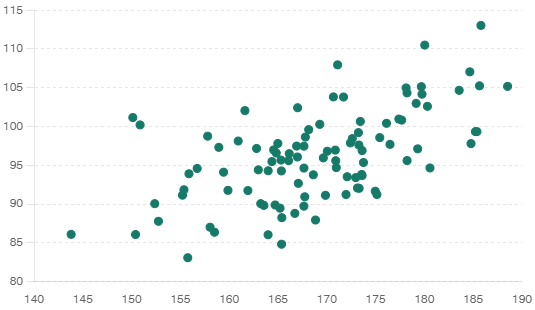
A scatter plot is a type of data visualization that uses dots to represent the values of two different variables. Each dot on the scatter plot represents one observation. The position of the dot on the horizontal axis (x-axis) corresponds to the value of one variable, while the position on the vertical axis (y-axis) corresponds to the value of the other variable.
Example
Imagine you have data on the height and weight of a group of people. You can use a scatter plot to see if there is a relationship between height and weight. Each dot on the scatter plot represents one person’s height and weight. For example, if someone is 170 cm tall and weighs 65 kg, there would be a dot at the point (170, 65) on the scatter plot.
Why Use a Scatter Plot?
Scatter plots are useful for several reasons:
Identifying Relationships
Scatter plots help you see if there is a relationship, or correlation, between two variables. For instance, in the example of height and weight, you might notice that as height increases, weight also tends to increase, indicating a positive correlation.
Detecting Outliers
Scatter plots make it easy to spot outliers, which are data points that don’t fit the general pattern of the data. Outliers can be important to identify because they might indicate an error in the data collection process or a special case that requires further investigation.
Understanding Distribution
Scatter plots provide a visual way to understand the distribution of data points. You can see how the data points are spread out, whether they cluster together, and if there are any patterns or trends.
How to Create a Scatter Plot
Creating a scatter plot involves a few simple steps. This guide will walk you through the process using a small dataset as an example. By the end, you’ll be able to create and interpret scatter plots with confidence.
Step 1: Collect Data
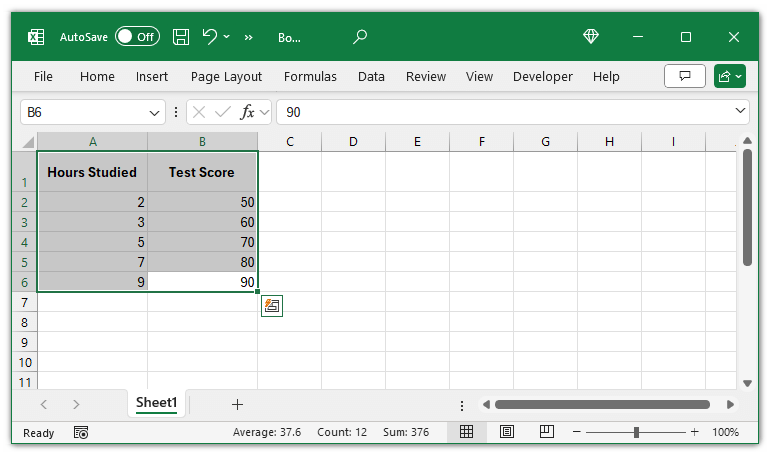
First, gather the data you want to plot. For this example, we’ll use data on the hours studied and test scores of students. Here’s the dataset:

This table shows the number of hours each student studied and the corresponding test scores they achieved.
Step 2: Set Up Axes
Next, decide which variable will go on the x-axis and which will go on the y-axis. Typically, the independent variable (the one you control or change) is placed on the x-axis, and the dependent variable (the one you measure) is placed on the y-axis.
In our example:
- Independent Variable (x-axis): Hours Studied
- Dependent Variable (y-axis): Test Score
This setup will help us see how changes in the number of hours studied affect test scores.
Step 3: Plot Data Points
Now, plot each pair of values on the graph. Each pair corresponds to one observation in our dataset. Here are the data points we need to plot:
- (2, 50)
- (3, 60)
- (5, 70)
- (7, 80)
- (9, 90)
To plot these points:
- Find the value for the x-axis (Hours Studied).
- Find the corresponding value for the y-axis (Test Score).
- Mark the point where these two values intersect on the graph.
Step 4: Draw the Scatter Plot
You can draw the scatter plot using graph paper, a spreadsheet application like Microsoft Excel or Google Sheets, or a coding tool like Python with Matplotlib. For simplicity, we’ll use Excel in this example.
Using Excel to Draw the Scatter Plot
Enter Your Data:
- Open Excel and enter your data in two columns. For example, Column A for Hours Studied and Column B for Test Scores.
Select Your Data:
- Click and drag to select all the data you entered.
Insert Scatter Plot:
- Go to the
Insert tab on the Excel ribbon. - In the
Charts group, click on the Scatter chart icon. - Choose the first scatter plot option.

Customize Your Plot (optional):
- Add titles to your axes and chart by clicking on the chart and selecting the
Chart Elements button (plus icon). - Label the x-axis as “Hours Studied” and the y-axis as “Test Score.”
- Add a title to the chart, such as “Relationship Between Hours Studied and Test Scores.”
Example Scatter Plot
Imagine a simple scatter plot with “Hours Studied” on the x-axis and “Test Score” on the y-axis. Each point on the graph corresponds to the data points from our table.
Interpreting Scatter Plots
Once you have your scatter plot, the next step is to interpret it. Here are a few key things to look for:
Identifying Correlations
Positive Correlation: If the dots tend to go from the bottom left to the top right, it indicates a positive correlation. This means that as one variable increases, the other variable also increases. In our example, more hours studied is associated with higher test scores.
Negative Correlation: If the dots go from the top left to the bottom right, it indicates a negative correlation. This means that as one variable increases, the other decreases. For example, if we had a dataset showing that as the number of hours of TV watched increases, the test scores decrease, we might see a negative correlation.
No Correlation: If the dots are scattered randomly with no discernible pattern, there is no correlation between the variables. This indicates that changes in one variable do not predict changes in the other.
Example Interpretation
In our example, the dots form a clear upward trend from left to right, indicating a positive correlation between hours studied and test scores. This suggests that, generally, students who study more tend to score higher on their tests.
Detecting Outliers
Outliers are points that stand out from the general pattern. They are significantly different from the other data points and can indicate special cases or errors. For instance, if there was a data point at (2, 90), it would be an outlier since it doesn’t fit the trend of the other points. This student studied for only 2 hours but scored 90, which is unusually high compared to others.
Outliers can provide valuable insights:
- They might highlight errors in data collection or entry.
- They could indicate unique conditions or exceptions.
- They can impact the overall analysis and should be investigated further.
Conclusion
Scatter plots are a versatile and easy-to-understand tool for visualizing the relationship between two variables. By following the steps outlined in this guide, you can create and interpret scatter plots to uncover valuable insights in your data. Whether you’re a student, a researcher, or a business professional, mastering scatter plots will enhance your data analysis skills and help you make informed decisions.
For further learning, consider exploring more advanced topics such as regression analysis and correlation coefficients, which can provide deeper insights into the relationships depicted by scatter plots.


