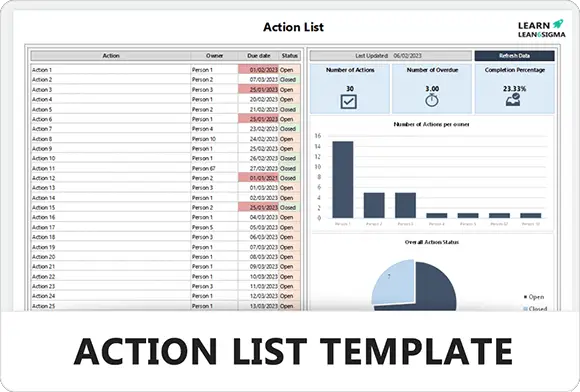
Action List Template

The Action List Template drives project execution by clearly defining tasks, owners, and deadlines. Use it to maintain accountability, monitor progress, and ensure critical activities are completed on time.

★★★★★
3.7 156 reviews
1K + Downloads
Updated February 2026
Template Hero

About this Template

The Action List (or Action Plan) is the engine of project execution. It translates high-level strategy into specific, assignable tasks. Without it, meetings end with "good ideas" but no real progress.

This template enforces the "Who, What, When" rule. Every entry must have a clear description of the task (What), a single owner responsible for its completion (Who), and a realistic deadline (When).

Use this tool to track meeting minutes, 8D corrective actions, project milestones, or daily stand-up commitments.

Pro Tip: Avoid "TBD" in the Due Date column. If you don't know the final deadline, set a deadline for the next step (e.g., "Determine final deadline by Friday").

STATUS TASK DESCRIPTION OWNER DUE Draft Project Charter Oct 12 JD Gather Requirements Oct 15 AS Client Approval Meeting Oct 20 --

Clear Ownership

Assigns every task to one specific individual. "The Team" cannot own a task; if everyone is responsible, no one is.

Defined Deadlines

Forces the team to commit to specific dates. This enables the Critical Path calculation and prevents drift.

Status Tracking

Provides a "pulse check" on the project. Visual indicators (Red/Yellow/Green) highlight blocked items instantly.

Living Document

Designed to be updated constantly. An Action List is not a "fire and forget" document; it evolves with the project.

FREE

Join the 28-Day Lean Challenge

Take your skills to the next level. Join 15,000+ practitioners and get exclusive tools delivered to your inbox.

Daily Lessons 5 Bonus Templates PDF Guides
Start the Challenge

No spam. Unsubscribe anytime.

The Action Management Cycle

A disciplined lifecycle to move tasks from "Idea" to "Done." This ensures accountability, transparency, and timely completion of projects.

Step 01

Identify Actions

Capture every necessary step during meetings, audits, or brainstorming sessions. Do not rely on memory. If it is not written down, it does not exist.

Goal:

A comprehensive raw list of potential tasks.

Step 02

Define Clearly

Vague tasks lead to poor results. Rename the task using a "Verb + Noun" structure to ensure clarity on what needs to be done.

  • Bad: "Update process."
  • Good: "Rewrite SOP-004 to include safety check."
Step 03

Assign Ownership

Assign one primary owner to each task. If multiple people are listed, accountability is diluted. The owner is responsible for getting it done, even if they delegate the work.

Rule:

One task, one owner.

Step 04

Set Deadlines

A task without a date is just a wish. Set realistic due dates based on the project timeline. Avoid "ASAP"—use specific dates (e.g., Oct 12th).

  • Check: Is the date feasible?
  • Track: Update dates if slippage occurs.
15
Step 05

Monitor Status

Regularly review the Action List. Update the status column (Not Started, In Progress, Blocked, Complete) to reflect reality.

Frequency:

Weekly or Daily Stand-up.

IN PROGRESS
Step 06

Verify & Close

Do not just take the owner's word for it. Verify the output (e.g., check the document, inspect the repair). Only mark as "Closed" when evidence is provided.

  • Output: Evidence of completion.
  • Status: 100% Done.
Execution FAQ

Common Questions

What is the difference between a Task and a Project?

A Task is a single, assignable action that can be completed by one person (e.g., "Draft email").

A Project is a collection of tasks that requires multiple steps or people (e.g., "Launch new website"). If an item on your list is too big, break it down into smaller sub-tasks.
PROJ

What if a deadline is missed?

Don't just ignore it. Mark it as Red/Late. Discuss why it was missed (Blockers? Resource issues?) and set a new realistic deadline.

Repeatedly missing dates destroys team credibility. If the date changes, update the log immediately.
! NEW

Can "The Team" own a task?

No. When everyone is responsible, no one is responsible.

Always assign a Single Point of Contact (SPOC). They don't have to do all the work themselves, but they are accountable for ensuring it gets done and reporting the status.
Free for Personal Use

Free

Instant Download • No CC Required

Download Excel
Secure SSL 256-bit Encrypted

What's Included

Free Template

Action List Template

Download Now

On this page